Janitorial contract compliance records for school and government buildings
When the facilities director or contracting officer asks for proof of performance, send a dated record of every visit, not a stack of timesheets.
Start 14-Day Free PilotNo credit card required • Set up in under 10 minutes
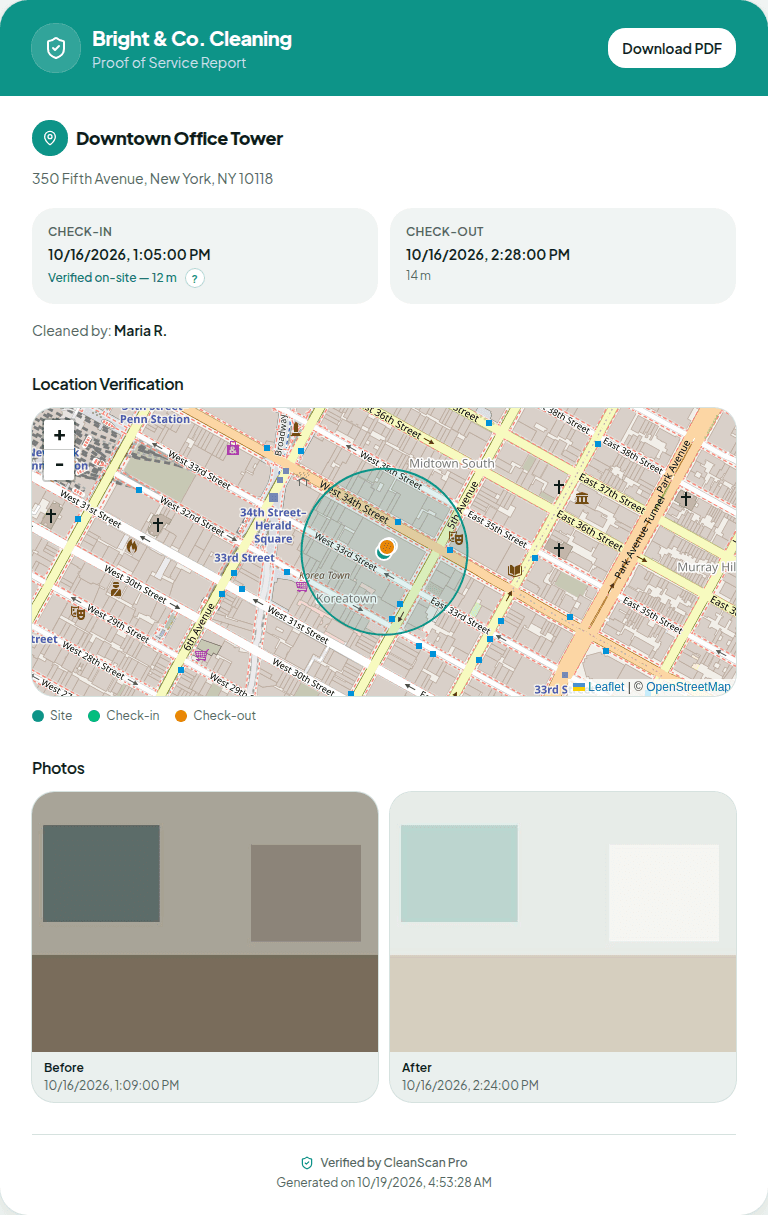
Public cleaning contracts come with paperwork. For most crews, janitorial contract compliance comes down to showing that each building was serviced when the contract says it would be. CleanScan Pro keeps a GPS-verified, time-stamped service log of every visit across every school and facility you cover, with photos where you require them.
The problem
“Every month the district wants proof of service for every building, and I lose a weekend rebuilding it from timesheets.”
What CleanScan Pro does
Every visit is already logged with location, check-in and check-out times, and photos. Search jobs by site name and download that visit's PDF. If you turn on the Friday summary, that email is a weekly record. There is no date-range filter. Each job shows its own date.
The problem
“If an inspector says a building was skipped, it's my word against theirs, and the contract is on the line.”
What CleanScan Pro does
Check-in and check-out are compared to each building's geofence and shown on a map in the report, with timestamps. A check-in outside the geofence is labeled with the distance. A building with no check-in is not flagged on its own.
The problem
“The RFP asks how we'll document performance, and 'we keep timesheets' doesn't win.”
What CleanScan Pro does
Bring a sample GPS-verified report to the walkthrough and attach one to your bid. It shows the evaluator exactly what they'll get each visit, branded with your company name.
How it works
1
Map every building
Add each school, campus building, or facility as its own geofenced site.
2
Crews log each visit
Custodians check in and out on any phone browser and take before and after photos where required. In gyms, basements, and portables with no signal, offline mode stores the visit and syncs when the phone reconnects.
3
Pull the record when asked
Download the PDF for a visit or share its link. Search the history by site name or cleaner name when the monthly report or a dispute comes up. There is no date-range filter.
Questions
Does CleanScan Pro satisfy my contract's reporting requirements?
We don't certify CleanScan Pro against any specific contract, agency, or regulation. Read the documentation terms in your contract. CleanScan Pro gives you per-visit records (location, times, and photos) that you can submit as proof of performance. Confirm the format with your contracting officer before you rely on it.
Is this an inspection or scoring tool?
No. CleanScan Pro records that your crew was at the building, when, and what it looked like before and after. It doesn't do checklists or scored inspections.
What about buildings with no cell signal?
Offline mode stores check-in data and photos on the phone when there's no signal, then syncs automatically when the connection comes back.
See it on your own sites tonight.
No credit card required • Set up in under 10 minutes